Code mode New in 0.11
Code mode lets you write a design by hand in MJML , a markup language that compiles to email-safe HTML, with Handlebars tags for the content. You get the same live preview as the editor, plus error checking by line.
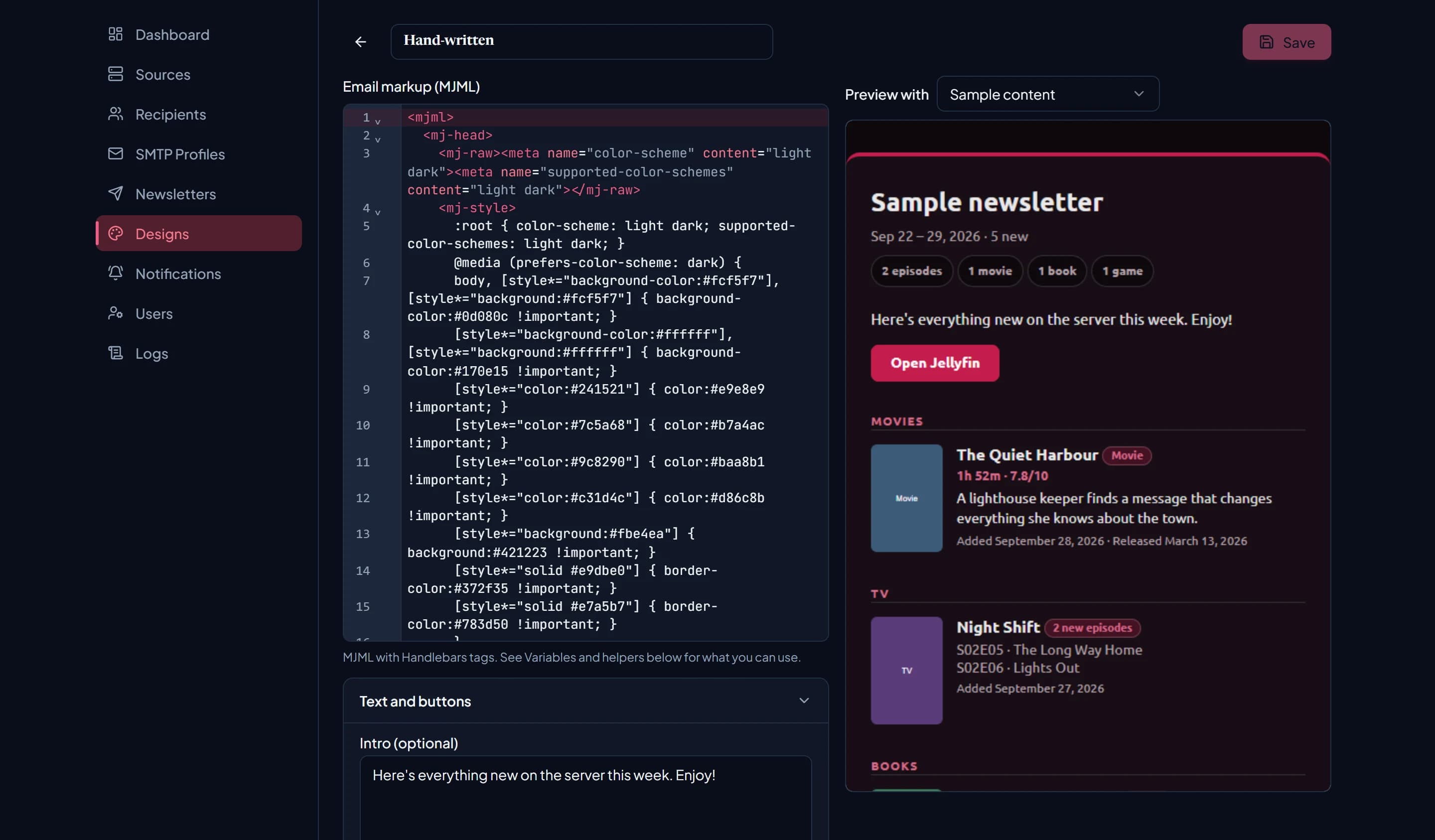
Switching to code
On an options design, save your changes, then choose Edit as code and confirm. You start from
the exact markup your options produced, with dark mode kept as a one-line latestarr:dark-mode
comment, so the email looks the same until you change it.
It’s one-way: the options stop applying once a design is code. To keep an options version, Duplicate the design first and convert the copy.
The editor sits beside the Text and buttons panel (still editable), a Variables and helpers reference, and the live preview.
Checking your code
LatestArr checks your code on every preview and every save:
- Errors block previewing and saving. They’re shown by line, e.g.
Line 12: A {{ }} tag on this line isn't valid. Check its braces and quotes.orLine 30: {{/if}} closes a {{#each}} block.Markup MJML can’t render at all is also an error. - Warnings come from MJML’s own validation, e.g. an unknown attribute. They’re shown as
Line N (warning): …and don’t stop you saving.
Code designs can be up to 200,000 characters.
Rules worth knowing
- Everything output with
{{variable}}is HTML-escaped. - Plain HTML must go inside
<mj-raw>. MJML silently drops HTML tags it doesn’t recognise anywhere else. - Poster URLs are swapped for embedded images at send time, so use
{{posterUrl}}as an image source and it just works. - Keep the
latestarr:dark-modecomment if you want dark-mode support. - The preview runs in a sandbox with scripts disabled. Email clients don’t run scripts either.
Variables
Newsletter
| Variable | Example |
|---|---|
{{newsletterName}} | Weekly Digest |
{{periodFormatted}} | Sep 21 – 28, 2026 |
{{generatedAtFormatted}} | September 27, 2026 |
{{lookbackDays}} | 7 |
{{itemCount}} | 31 |
{{#each kindCounts}}{{this}}{{/each}} | “23 episodes”, “8 movies”, largest first |
{{introText}} | The design’s intro |
{{footerNote}} | The design’s footer note |
{{#each ctas}}{{label}} {{url}}{{/each}} | The design’s buttons |
{{#each sourceButtons}}{{label}} {{url}}{{/each}} | Where to watch buttons, e.g. Watch on Plex |
{{#sourceButtonsFor contentType="movie"}}…{{/sourceButtonsFor}} | Just the where to watch buttons for one type |
Items
Inside {{#each items}} or {{#mediaList}}:
| Field | Notes |
|---|---|
title | For episodes, the show’s name. |
subtitle | Episode (“S02E05 · The Long Way Home”), author, or platform. |
overview | Full summary. |
overviewShort | About 180 characters, cut at a word. |
contentLabel | Badge text: Movie, TV Episode, TV Season, Book, Ebook, Comic, Audiobook, Podcast, Game. |
kind | movie, tv_episode, tv_season, book, audiobook, or game. |
posterUrl | Embedded at send time. |
externalUrl | Link to the item on your server. |
addedAtFormatted, releaseDateFormatted | Formatted dates. |
genres | Comma-separated. |
rating | e.g. “8.1/10” |
runtimeFormatted | e.g. “1h 45m” |
pageCount, durationFormatted, platform | Where the source provides them. |
detailsLine | Runtime, pages, length, or platform, then rating, joined with ” · ”. Empty if none apply. |
episodeCount, episodes, moreEpisodes | On a grouped show row. Each of episodes has subtitle and externalUrl. |
isFallback | True for “From the library” filler items. |
Use {{#if items.length}} to test whether there’s anything at all.
Helpers
Alongside Handlebars’ built-in if, unless, each, and with, there are three helpers.
mediaList
A filtered, trimmed each. The block runs once per matching item.
{{#mediaList contentType="tv_episode,tv_season" count=10 groupEpisodes="true"}}
  {{title}} {{#if episodeCount}}· {{episodeCount}} new episodes{{/if}}
{{/mediaList}}| Argument | Values |
|---|---|
contentType | One or more kinds, comma-separated, e.g. "movie" or "tv_episode,tv_season". |
sort | added (default) or mostWatched. |
count | Maximum items. |
order | sequential (default) or random. |
showAll | "true" ignores count. |
groupEpisodes | "true" folds a show’s episodes into one row. |
emptyFallback | What to show when nothing matches: none, link, or random. |
fallbackLinkLabel | Text for the link fallback. Default “Browse the library”. |
fallbackCount | How many random fallback items. Defaults to count, or 5. |
fallbackWrap | "none" stops the link fallback being wrapped in <mj-raw> for you. |
sort="mostWatched" uses play counts from Tautulli, and LatestArr only
fetches them when your markup asks for them.
ifAnyItems
Whether any items match. Takes the same contentType and sort arguments.
{{#ifAnyItems contentType="book"}}
  …books section…
{{else}}
  <mj-text>No new books this time.</mj-text>
{{/ifAnyItems}}
ifKindLinked
Whether any of the newsletter’s sources can provide a type, or items of that type exist. Use it to hide a whole section for a type you don’t have.
{{#ifKindLinked contentType="game"}}
  …games section…
{{/ifKindLinked}}
A small example
Trimmed from the markup the Default design produces:
<mjml>
  <mj-body>
    <mj-section><mj-column>
      <mj-text font-size="26px" font-weight="700">{{newsletterName}}</mj-text>
      {{#if introText}}<mj-text>{{introText}}</mj-text>{{/if}}
    </mj-column></mj-section>

    {{#ifKindLinked contentType="movie"}}
    <mj-section><mj-column>
      <mj-text text-transform="uppercase">Movies</mj-text>
      <mj-raw><tr><td style="padding:0 25px;">
        {{#mediaList contentType="movie"}}
          <div>
            <a href="{{externalUrl}}">{{title}}</a> {{contentLabel}}
            {{#if detailsLine}}<div>{{detailsLine}}</div>{{/if}}
          </div>
        {{/mediaList}}
      </td></tr></mj-raw>
      {{#ifAnyItems contentType="movie"}}{{else}}
        <mj-text>Nothing new this time.</mj-text>
      {{/ifAnyItems}}
    </mj-column></mj-section>
    {{/ifKindLinked}}
  </mj-body>
</mjml>
Troubleshooting
- Something disappeared from the preview. It’s probably plain HTML outside
<mj-raw>. - “Line N” points somewhere odd. Look a few lines up for an unclosed
{{#if}}or{{#each}}, or a missing quote in a helper argument. - Styles don’t apply in some clients. Email clients support a small subset of CSS. Prefer MJML attributes, and check with a test send.
- Dark mode stopped working. You probably deleted the
latestarr:dark-modecomment. Add the line back inside<mj-head>.
At send time, a mistake that only produces warnings still sends a best-effort email, so always preview after edits.